> ## Documentation Index
> Fetch the complete documentation index at: https://docs.floto.ai/llms.txt
> Use this file to discover all available pages before exploring further.
# Design Audit
> Get instant AI feedback using proven UX heuristics
## Overview
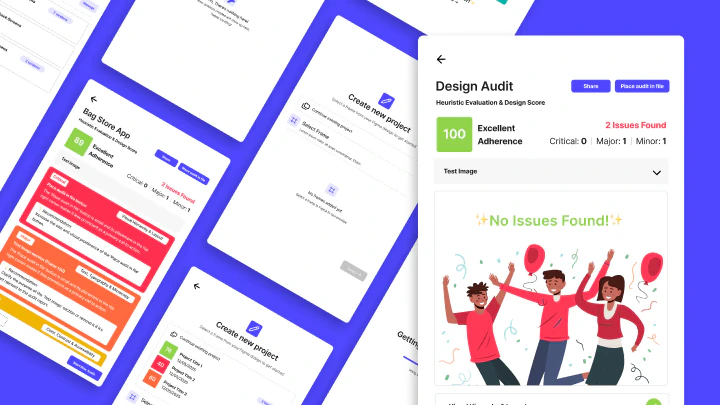
Design Audit analyzes your Figma designs against **Nielsen's 10 Usability Heuristics** and accessibility standards. Run an audit in less than 2 minutes and get a prioritized list of UX issues with actionable recommendations.
 **Time to audit**: \~2 minutes per frame\
**Cost**: 20 credits per audit\
**Supported frames**: Any single Figma frame (recommended: screens, wireframes, mockups)
***
## How It Works: 5 Steps
### Step 1: Open Design Audit
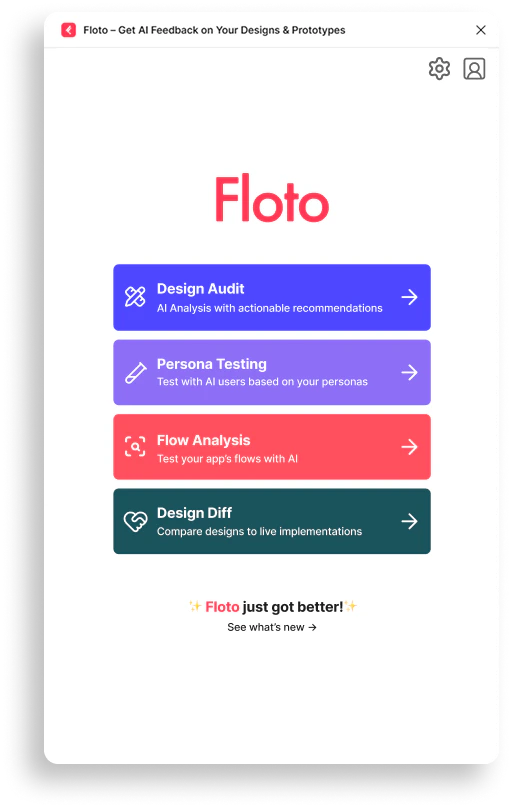
Click **Design Audit** in the Floto plugin.
**Time to audit**: \~2 minutes per frame\
**Cost**: 20 credits per audit\
**Supported frames**: Any single Figma frame (recommended: screens, wireframes, mockups)
***
## How It Works: 5 Steps
### Step 1: Open Design Audit
Click **Design Audit** in the Floto plugin.
 Your frame is evaluated against established design principles, accessibility standards, and usability heuristics:
* **Nielsen's 10 Usability Heuristics** - Core UX principles
* **WCAG Accessibility Standards** - Accessibility guidelines
* **Usability Best Practices** - Industry standards
### Step 2: Select a Frame & Audit Type
1. **Select the frame** you want feedback on
2. **Choose the audit type** depending on the feedback you need
Your frame is evaluated against established design principles, accessibility standards, and usability heuristics:
* **Nielsen's 10 Usability Heuristics** - Core UX principles
* **WCAG Accessibility Standards** - Accessibility guidelines
* **Usability Best Practices** - Industry standards
### Step 2: Select a Frame & Audit Type
1. **Select the frame** you want feedback on
2. **Choose the audit type** depending on the feedback you need
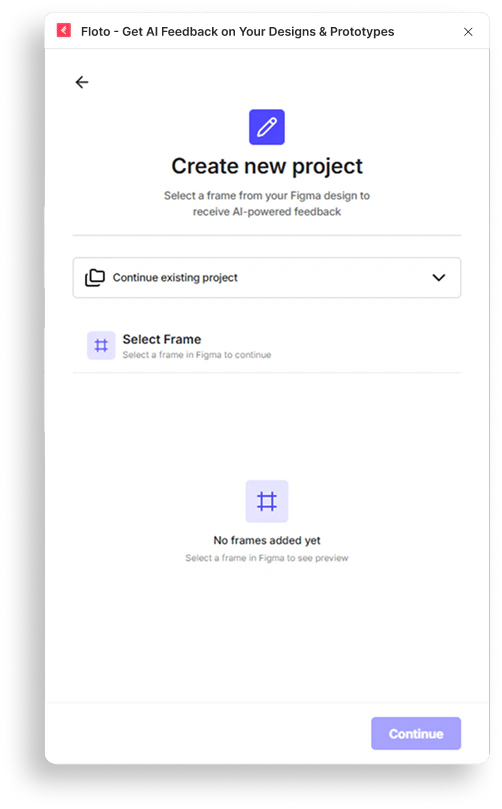 Floto audits **one frame at a time**. Select the specific screen, component, or layout you want analyzed.
**Available Audit Types:**
* **Heuristic Evaluation** - Evaluates design against Nielsen's 10 Usability Heuristics
* **Accessibility Audit** - Checks WCAG compliance and accessibility standards
### Step 3: Run Your Audit
Floto audits **one frame at a time**. Select the specific screen, component, or layout you want analyzed.
**Available Audit Types:**
* **Heuristic Evaluation** - Evaluates design against Nielsen's 10 Usability Heuristics
* **Accessibility Audit** - Checks WCAG compliance and accessibility standards
### Step 3: Run Your Audit
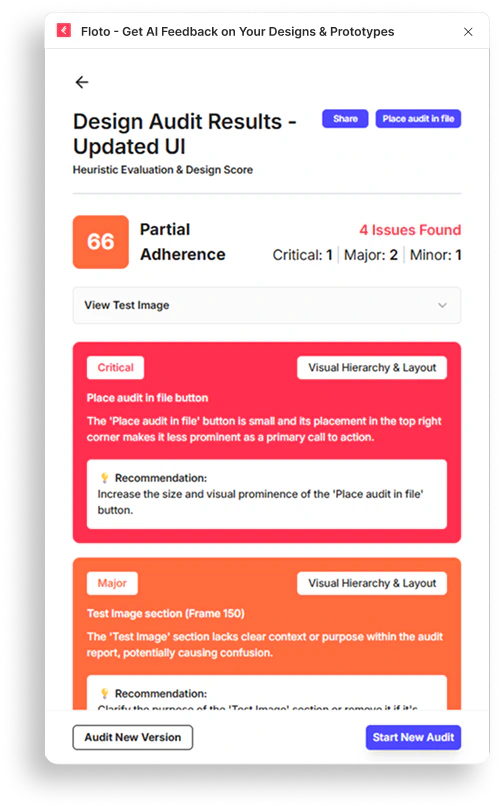 Floto scans your frame for:
* **UX Issues** - Usability problems and potential confusion points
* **Accessibility Problems** - WCAG violations and accessibility gaps
* **Usability Gaps** - Deviations from established best practices
Processing stages:
1. Processing design elements
2. Analyzing UI patterns
3. Evaluating usability
4. Generating recommendations
5. Finalizing analysis
You receive:
* **Overall Score** (0-100) - Your frame's compliance score
* **Severity Breakdown** - Issues categorized by impact
### Step 4: Place Audit in Your File
Floto scans your frame for:
* **UX Issues** - Usability problems and potential confusion points
* **Accessibility Problems** - WCAG violations and accessibility gaps
* **Usability Gaps** - Deviations from established best practices
Processing stages:
1. Processing design elements
2. Analyzing UI patterns
3. Evaluating usability
4. Generating recommendations
5. Finalizing analysis
You receive:
* **Overall Score** (0-100) - Your frame's compliance score
* **Severity Breakdown** - Issues categorized by impact
### Step 4: Place Audit in Your File
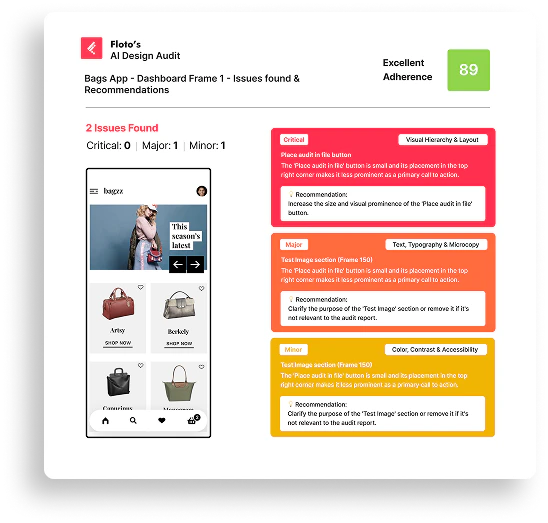 Drop the audit results directly onto your Figma canvas.
Keep feedback visible as you work:
* No switching tabs or losing context
* Reference issues while making design changes
* Track progress as you fix problems
### Step 5: Fix and Retest
Drop the audit results directly onto your Figma canvas.
Keep feedback visible as you work:
* No switching tabs or losing context
* Reference issues while making design changes
* Track progress as you fix problems
### Step 5: Fix and Retest
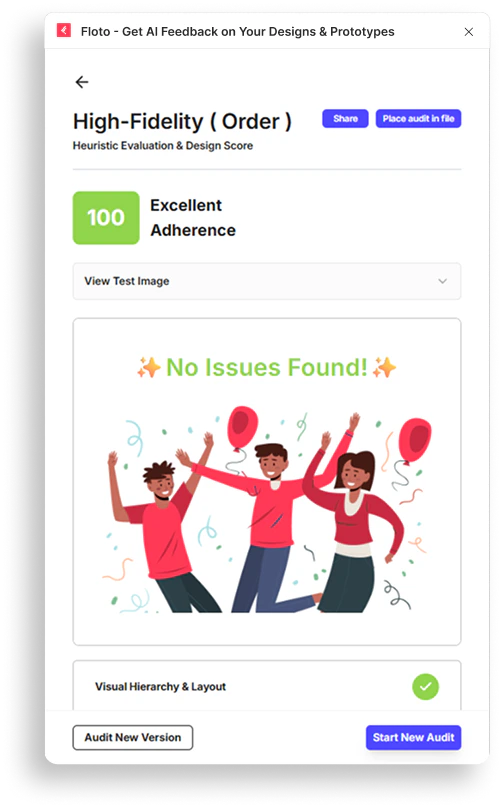 Make changes to your design, then run the audit again.
Watch your compliance score improve with each iteration:
* Identify which issues were resolved
* Focus on remaining high-severity problems
* Ship when you're confident in your design
***
## Understanding Your Audit Results
### Overall Score
Your frame receives a score from 0-100 based on adherence to usability principles:
| Score Range | Evaluation |
| ----------- | ----------------------------- |
| 90-100 | Excellent Adherence |
| 60-89 | Good/Partial Adherence |
| 0-59 | Needs Significant Improvement |
### Issue Severity Levels
Each issue is categorized by impact:
* **Critical** - Severe usability problems that block users
* **Major** - Significant issues affecting user experience
* **Minor** - Small improvements that enhance usability
* **Suggestion** - Optional enhancements and best practices
### Issue Details
For each issue, you receive:
| Field | Description |
| ------------------ | ---------------------------------------------- |
| **Category** | Heuristic name or accessibility rule |
| **Location** | Where in the frame the issue appears |
| **Description** | What the problem is and why it matters |
| **Recommendation** | How to fix the issue |
| **Severity** | Impact level (Critical/Major/Minor/Suggestion) |
***
## Nielsen's 10 Usability Heuristics
The audit evaluates your design against these 10 core UX principles:
1. **Visibility of System Status** - Users stay informed in real time
2. **Match Between System and Real World** - Language and conventions users understand
3. **User Control and Freedom** - Emergency exits and undo/redo
4. **Consistency and Standards** - Follow platform conventions
5. **Error Prevention** - Prevent problems before they occur
6. **Recognition Rather Than Recall** - Minimize memory load
7. **Flexibility and Efficiency of Use** - Shortcuts and customization
8. **Aesthetic and Minimalist Design** - Focus on essentials
9. **Help Users Recognize, Diagnose, and Recover From Errors** - Plain language error messages
10. **Help and Documentation** - Easy to search, task-focused help
***
## Frame Requirements
### Supported Frames
* Single Figma frames
* Screens, wireframes, mockups
* Component designs
* Prototypes and flows
### Frame Size
* **No minimum size**
* **Maximum size**: 20MB
* Recommended: 320px - 1920px width for best results
### Frame Contents
* **Text content** - Readable text and labels
* **UI elements** - Buttons, forms, navigation
* **Visual design** - Colors, spacing, typography
***
## Audit Limitations
* Floto audits **one frame per request**
* Audits are based on **visual design only** - Doesn't test live functionality
* Results reflect **current design state** - Changes require new audit
* Audit can take up to **2 minutes** to process complex designs
***
## FAQ
Audits typically complete in 30 seconds to 2 minutes, depending on frame complexity. You'll see progress updates during analysis.
No, Floto audits one frame at a time. Run separate audits for different screens or components.
Start with **Critical** severity issues - these have the biggest impact on user experience. Fix those first, then move to Major and Minor issues.
Yes! Make design updates in Figma, then run a new audit on the updated frame. Compare scores to see improvement.
Yes, audits include WCAG accessibility standards. Issues include accessibility problems like contrast, readability, and keyboard navigation.
Each audit costs **20 credits**. Credits reset monthly on your plan.
Yes, use the Share button in your results to generate a public link. Share with teammates, stakeholders, or in design reviews.
**Heuristic Evaluation** focuses on usability principles and user experience. **Accessibility Audit** emphasizes WCAG compliance and accessibility standards. Both include some overlap.
***
## Next Steps
* Run your first Design Audit on a key screen
* Review Critical and Major issues
* Make improvements based on recommendations
* Retest to see your score improve
* Share results with your team
Make changes to your design, then run the audit again.
Watch your compliance score improve with each iteration:
* Identify which issues were resolved
* Focus on remaining high-severity problems
* Ship when you're confident in your design
***
## Understanding Your Audit Results
### Overall Score
Your frame receives a score from 0-100 based on adherence to usability principles:
| Score Range | Evaluation |
| ----------- | ----------------------------- |
| 90-100 | Excellent Adherence |
| 60-89 | Good/Partial Adherence |
| 0-59 | Needs Significant Improvement |
### Issue Severity Levels
Each issue is categorized by impact:
* **Critical** - Severe usability problems that block users
* **Major** - Significant issues affecting user experience
* **Minor** - Small improvements that enhance usability
* **Suggestion** - Optional enhancements and best practices
### Issue Details
For each issue, you receive:
| Field | Description |
| ------------------ | ---------------------------------------------- |
| **Category** | Heuristic name or accessibility rule |
| **Location** | Where in the frame the issue appears |
| **Description** | What the problem is and why it matters |
| **Recommendation** | How to fix the issue |
| **Severity** | Impact level (Critical/Major/Minor/Suggestion) |
***
## Nielsen's 10 Usability Heuristics
The audit evaluates your design against these 10 core UX principles:
1. **Visibility of System Status** - Users stay informed in real time
2. **Match Between System and Real World** - Language and conventions users understand
3. **User Control and Freedom** - Emergency exits and undo/redo
4. **Consistency and Standards** - Follow platform conventions
5. **Error Prevention** - Prevent problems before they occur
6. **Recognition Rather Than Recall** - Minimize memory load
7. **Flexibility and Efficiency of Use** - Shortcuts and customization
8. **Aesthetic and Minimalist Design** - Focus on essentials
9. **Help Users Recognize, Diagnose, and Recover From Errors** - Plain language error messages
10. **Help and Documentation** - Easy to search, task-focused help
***
## Frame Requirements
### Supported Frames
* Single Figma frames
* Screens, wireframes, mockups
* Component designs
* Prototypes and flows
### Frame Size
* **No minimum size**
* **Maximum size**: 20MB
* Recommended: 320px - 1920px width for best results
### Frame Contents
* **Text content** - Readable text and labels
* **UI elements** - Buttons, forms, navigation
* **Visual design** - Colors, spacing, typography
***
## Audit Limitations
* Floto audits **one frame per request**
* Audits are based on **visual design only** - Doesn't test live functionality
* Results reflect **current design state** - Changes require new audit
* Audit can take up to **2 minutes** to process complex designs
***
## FAQ
Audits typically complete in 30 seconds to 2 minutes, depending on frame complexity. You'll see progress updates during analysis.
No, Floto audits one frame at a time. Run separate audits for different screens or components.
Start with **Critical** severity issues - these have the biggest impact on user experience. Fix those first, then move to Major and Minor issues.
Yes! Make design updates in Figma, then run a new audit on the updated frame. Compare scores to see improvement.
Yes, audits include WCAG accessibility standards. Issues include accessibility problems like contrast, readability, and keyboard navigation.
Each audit costs **20 credits**. Credits reset monthly on your plan.
Yes, use the Share button in your results to generate a public link. Share with teammates, stakeholders, or in design reviews.
**Heuristic Evaluation** focuses on usability principles and user experience. **Accessibility Audit** emphasizes WCAG compliance and accessibility standards. Both include some overlap.
***
## Next Steps
* Run your first Design Audit on a key screen
* Review Critical and Major issues
* Make improvements based on recommendations
* Retest to see your score improve
* Share results with your team