> ## Documentation Index
> Fetch the complete documentation index at: https://docs.floto.ai/llms.txt
> Use this file to discover all available pages before exploring further.
# Flow Analysis
> Analyze your flows for missing paths and states
## Overview
Flow Analysis tests complete user journeys to identify missing paths, states, and friction points. Analyze static flows for edge cases or test interactive prototypes with real user tasks.
**Time per analysis**: \~2-3 minutes\
**Cost**: 75 credits per analysis\
**Frames**: 1-6 for missing states, 2-6 for flow testing
***
## Two Features
Choose how you want to analyze your flow:
### Missing States
Analyze static screens for missing states and edge cases.
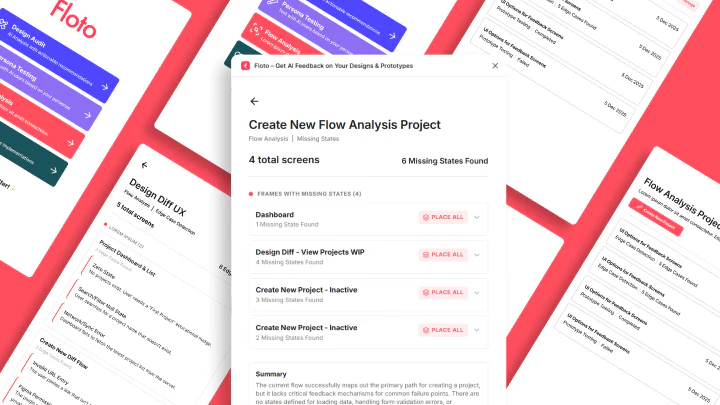 **Select 1-6 frames** that are part of a flow. Floto identifies:
* Missing states and scenarios
* Incomplete edge cases
* Gaps in user journey
* State transitions that are missing
### Flow Testing
Test interactive prototypes to see how users navigate.
**Select 1-6 frames** that are part of a flow. Floto identifies:
* Missing states and scenarios
* Incomplete edge cases
* Gaps in user journey
* State transitions that are missing
### Flow Testing
Test interactive prototypes to see how users navigate.
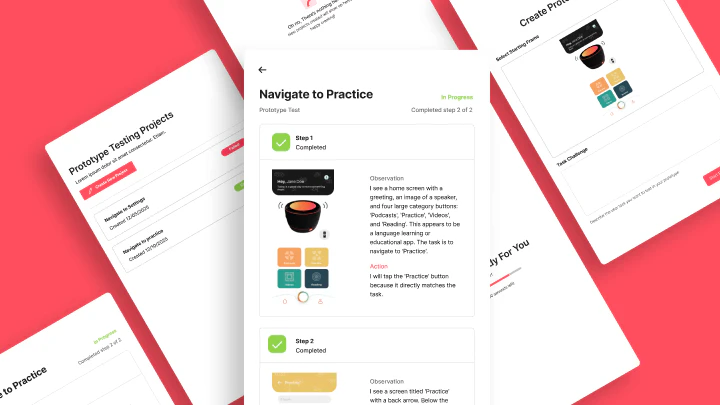 **Select a start frame** + **define a task**.
Requirement: Figma prototype must be connected to your start frame (frames linked via prototype connections in Figma).
Task example: "Sign up for an account", "Complete checkout", "Find the pricing page"
Floto simulates:
* How users move through your prototype
* Where they get stuck or hesitate
* Where they'd drop off
* Unclear navigation paths
***
## How It Works
### Step 1: Open Flow Analysis
Click **Flow Analysis** in the Floto plugin.
**Select a start frame** + **define a task**.
Requirement: Figma prototype must be connected to your start frame (frames linked via prototype connections in Figma).
Task example: "Sign up for an account", "Complete checkout", "Find the pricing page"
Floto simulates:
* How users move through your prototype
* Where they get stuck or hesitate
* Where they'd drop off
* Unclear navigation paths
***
## How It Works
### Step 1: Open Flow Analysis
Click **Flow Analysis** in the Floto plugin.
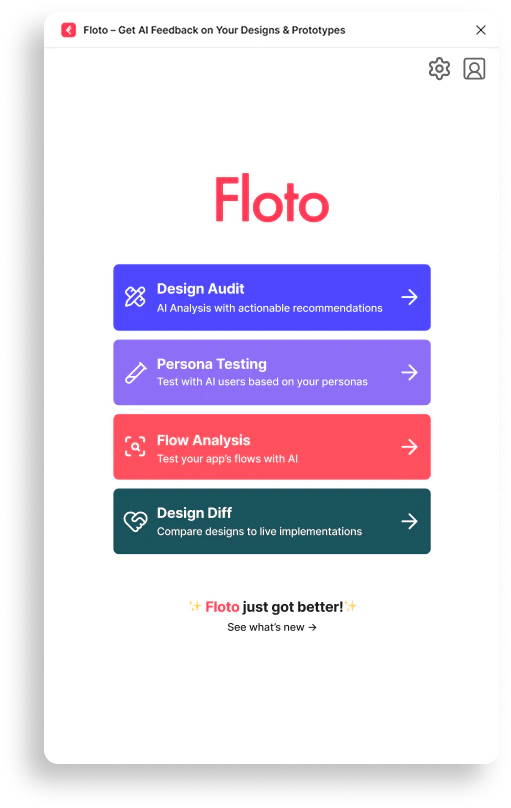 Test complete user journeys—onboarding, checkout, and any critical path. See where users get stuck before they hit production.
### Step 2: Choose Analysis Type
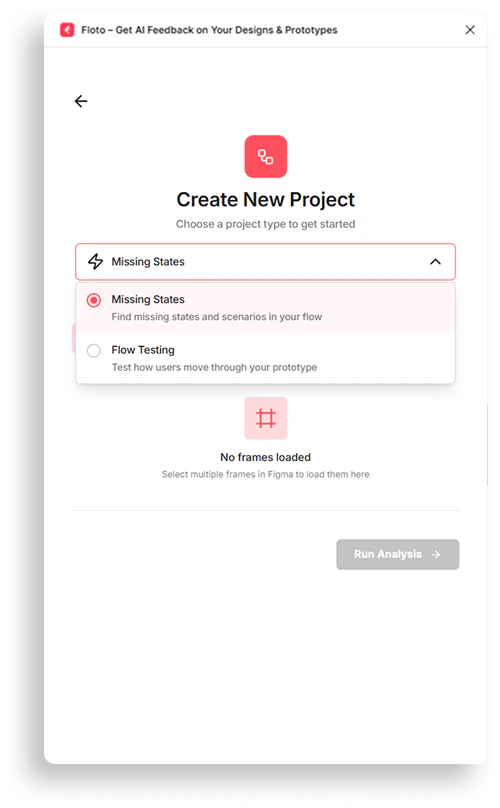
Select one of two types:
* **Missing States** - Find missing states and incomplete scenarios
* **Flow Testing** - Test how users move through your prototype
Test complete user journeys—onboarding, checkout, and any critical path. See where users get stuck before they hit production.
### Step 2: Choose Analysis Type
Select one of two types:
* **Missing States** - Find missing states and incomplete scenarios
* **Flow Testing** - Test how users move through your prototype
 ***
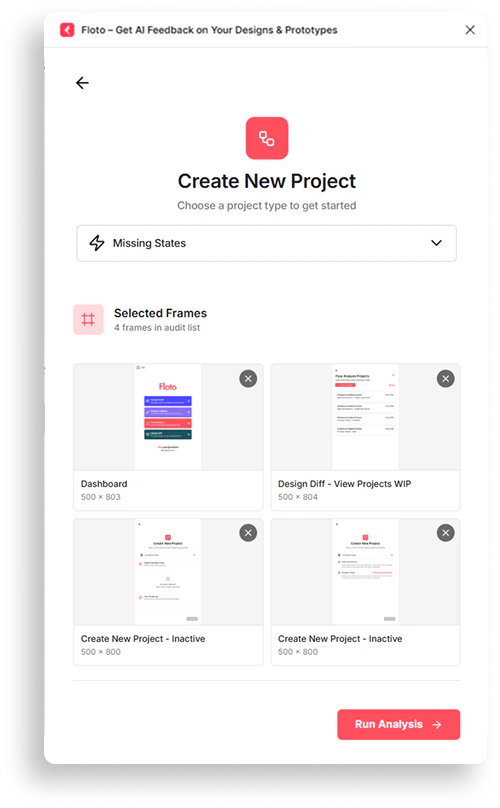
### Step 3: Select Frames
**For Missing States:**
* Select 1-6 frames representing your flow
* Can be screens, wireframes, mockups, or components
***
### Step 3: Select Frames
**For Missing States:**
* Select 1-6 frames representing your flow
* Can be screens, wireframes, mockups, or components
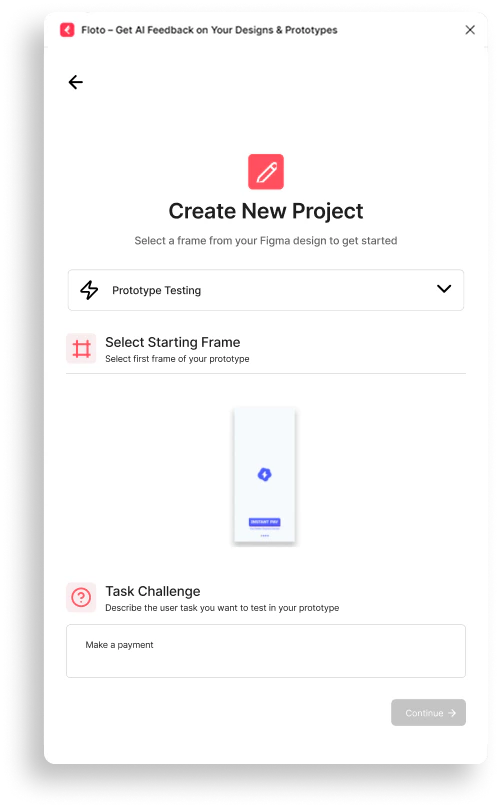
 **For Flow Testing:**
* Select a start frame
* Figma prototype must be connected to that frame (prototype connections required)
* Define what users should accomplish:
* "Sign up for an account"
* "Complete checkout"
* "Find pricing and select a plan"
* "Reset a forgotten password"
**For Flow Testing:**
* Select a start frame
* Figma prototype must be connected to that frame (prototype connections required)
* Define what users should accomplish:
* "Sign up for an account"
* "Complete checkout"
* "Find pricing and select a plan"
* "Reset a forgotten password"
 ### Step 4: Review Results
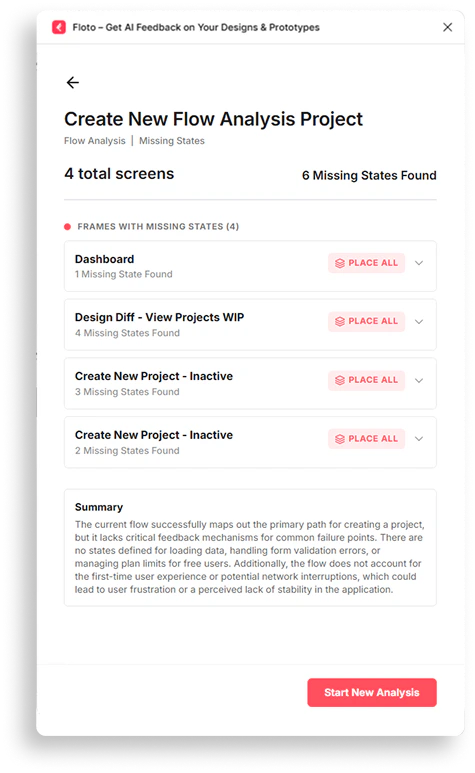
**For Missing States:**
### Step 4: Review Results
**For Missing States:**
 **For Flow Testing:**
 ***
## Understanding Results
### Missing States Report
For each gap identified:
* **State** - What's missing
* **Context** - Where in the flow it's missing
* **Impact** - Why it matters for user experience
* **Fix** - How to add the missing state
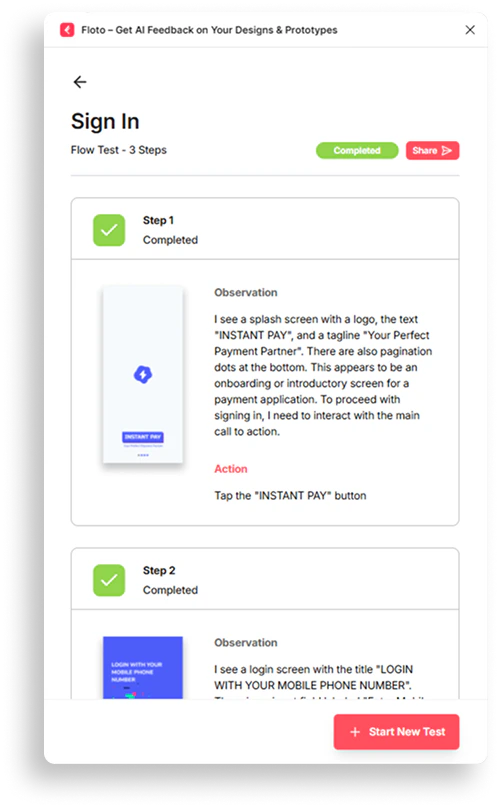
### Flow Test Report
See how users navigate:
* **Path taken** - Which screens the AI visited
* **Task completion** - Did they achieve the goal?
* **Friction points** - Where they hesitated
* **Unclear interactions** - Buttons/paths that confused them
* **Drop-off points** - Where they got stuck
***
## Frame Requirements
### Supported Frames
* Figma frames, screens, components
* Wireframes and mockups
* Interactive prototypes (for flow testing)
### Frame Size
* No minimum size
* Maximum: 20MB per frame
* Recommended: 320px - 1920px width
### Frame Selection
**Missing States**: 1-6 frames
**Flow Testing**: 1 start frame
* Figma prototype must be connected to that frame
* Prototype connections required in Figma (interactions set up)
***
## FAQ
**Missing States** if you want to find incomplete states and edge cases in static designs. **Flow Testing** if you have an interactive prototype and want to see how users navigate to accomplish a task.
Yes. Frames should have logical navigation so users can move between them based on the task goal.
Yes. Run separate analyses for different user journeys (onboarding, checkout, account settings, etc.).
Use Missing States instead. It analyzes static screens without requiring navigation.
Each analysis costs **75 credits**, whether Missing States or Flow Testing.
Yes. Flow Testing shows friction points, hesitations, and drop-off locations in your flow.
The report shows where the AI got stuck or dropped off. Review that step to fix the unclear navigation or missing interaction.
Save and reference results from your project history. Share through your team workspace.
***
## Next Steps
* Identify a critical user flow (signup, checkout, onboarding)
* Run Missing States analysis to find gaps
* Or test an interactive prototype with Flow Testing
* Review friction points and missing paths
* Update your design based on findings
* Retest to verify improvements
***
## Understanding Results
### Missing States Report
For each gap identified:
* **State** - What's missing
* **Context** - Where in the flow it's missing
* **Impact** - Why it matters for user experience
* **Fix** - How to add the missing state
### Flow Test Report
See how users navigate:
* **Path taken** - Which screens the AI visited
* **Task completion** - Did they achieve the goal?
* **Friction points** - Where they hesitated
* **Unclear interactions** - Buttons/paths that confused them
* **Drop-off points** - Where they got stuck
***
## Frame Requirements
### Supported Frames
* Figma frames, screens, components
* Wireframes and mockups
* Interactive prototypes (for flow testing)
### Frame Size
* No minimum size
* Maximum: 20MB per frame
* Recommended: 320px - 1920px width
### Frame Selection
**Missing States**: 1-6 frames
**Flow Testing**: 1 start frame
* Figma prototype must be connected to that frame
* Prototype connections required in Figma (interactions set up)
***
## FAQ
**Missing States** if you want to find incomplete states and edge cases in static designs. **Flow Testing** if you have an interactive prototype and want to see how users navigate to accomplish a task.
Yes. Frames should have logical navigation so users can move between them based on the task goal.
Yes. Run separate analyses for different user journeys (onboarding, checkout, account settings, etc.).
Use Missing States instead. It analyzes static screens without requiring navigation.
Each analysis costs **75 credits**, whether Missing States or Flow Testing.
Yes. Flow Testing shows friction points, hesitations, and drop-off locations in your flow.
The report shows where the AI got stuck or dropped off. Review that step to fix the unclear navigation or missing interaction.
Save and reference results from your project history. Share through your team workspace.
***
## Next Steps
* Identify a critical user flow (signup, checkout, onboarding)
* Run Missing States analysis to find gaps
* Or test an interactive prototype with Flow Testing
* Review friction points and missing paths
* Update your design based on findings
* Retest to verify improvements